Link Management Logo
Link Management
4.4/5
Dead links hide in every space. Domain changes take days. Link Management fixes both.
Get an organized view of every link in your Confluence space, flag broken URLs automatically, and bulk-replace domains or patterns — without opening every page.
We empower 3.3+ million users worldwide
Features

What Link Management does

Space-wide link overview

See every external and internal link in a space in one table — with occurrence counts, domains grouped, and quick access to where each link is used.

Bulk domain edits

Rename a domain or replace a URL pattern across every page in a space. One change, hundreds of links updated — no manual hunt through Confluence.

Broken link detection

Automatically check external and internal links and flag broken URLs in the space settings view — fix problems before readers land on a 404.

Per-link editing

Drill into a single link to see every page that uses it, edit the title or URL, and apply changes with a preview before saving.

Regex-powered replacements

Use regular expressions for advanced bulk edits when a simple find-and-replace is not enough — ideal after rebrands or platform migrations.

Page Links Macro

Show every hyperlink on a Confluence page in one list — outbound URLs and internal page references, without scanning the full page content.
Who it's for

Built for these teams

Documentation teams
Keep runbooks, wikis, and product docs trustworthy by catching dead links and updating references after every reorganization.
Space admins & IT
Replace outdated domains, fix vendor URL changes, and audit link health across spaces without granting broad edit access to every page.
Knowledge managers
Maintain content quality at scale — working links mean better search results, including for Rovo and other AI tools that rely on your wiki.
Cloud migration teams
Scan migrated spaces for broken internal links after URL changes, surface what needs fixing in one dashboard, and go live with documentation that actually works.
Compliance & governance
Audit outbound links to external systems, update policy references after regulatory changes, and keep approved documentation accurate.
Content & marketing
Update campaign landing pages, partner URLs, and brand domains across Confluence in minutes instead of page-by-page edits.
Link Management by Lively Apps turns link upkeep from a manual chore into a governed workflow — see every link, fix what is broken, and bulk-update what changed.
How it works

The gap between scattered links and reliable docs

Links live on hundreds of Confluence pages — in body text, tables, macros, and attachments. When a domain changes or a page moves, nobody knows how many references are affected until someone clicks a dead link.

Link Management closes that gap. Admins open one space-level view, see every link with status indicators, and fix issues individually or in bulk — without hunting through pages one by one.
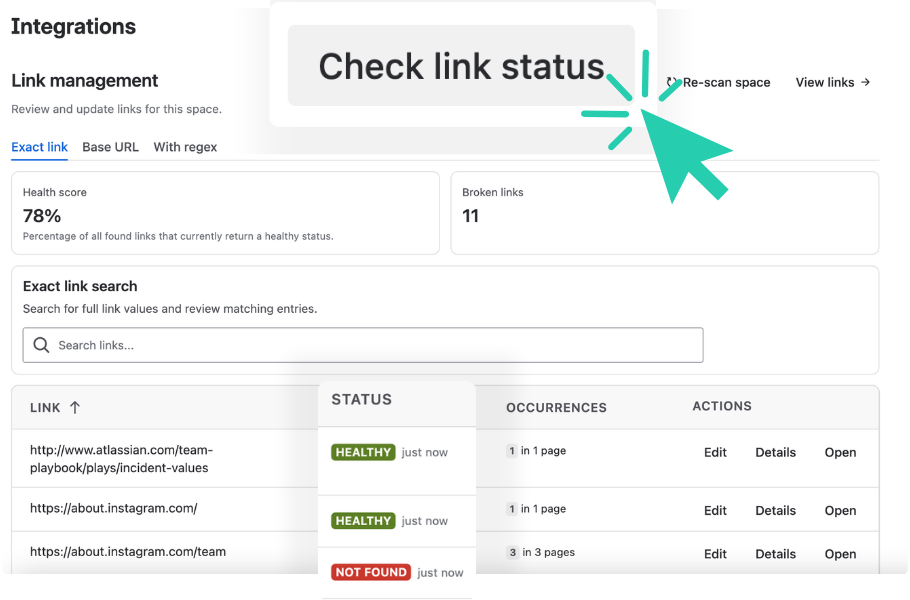
Link Management broken link detection dashboard in Confluence space settings

From scattered links to a clean space

Scan your space

Link Management collects every link in the space — external URLs and internal Confluence references — and groups them by domain with occurrence counts.

Review link health

See which links are healthy, which are broken, and where each one appears. Filter by domain, status, or starred favorites to prioritize fixes.

Fix at any scale

Edit a single link, bulk-replace a domain across the whole space, or use regex for complex migrations — then save and changes apply automatically.

Built with Forge

Atlassian Silver Marketplace Partner Badge

Built with Forge

It's in your safe space! Link Management is built on Atlassian's highly secure Forge platform.
FAQ

Frequently asked questions

What problem does Link Management solve?

Links in Confluence spread across hundreds of pages. When domains change or pages move, fixing them one by one is painful. Link Management gives space admins a single view of every link and tools to edit or bulk-replace them.

Can Link Management detect broken links?

Yes. Link Management can check external and internal Confluence links and flag broken URLs directly in the space settings view — so you fix problems before readers hit a 404.

Can I bulk-edit links across a space?

Yes. Replace a domain or URL pattern across every occurrence in a space in a few clicks. Regex-powered bulk edits are also supported for advanced replacements.

Who can use Link Management?

Space admins manage links from Space Settings → Integrations → Link Management. End users can access the Links section under Space Apps to view and update links they have permission to edit.

Is Link Management helpful for Cloud migration?

Yes. During Data Center to Cloud migration, internal page URLs often change and thousands of links can break. Link Management scans migrated spaces, surfaces broken links in one place, and lets admins fix them at scale.

Does Link Management work with internal Confluence links?

Yes. Link Management covers both external URLs and internal links to other Confluence pages — including cross-space references where permissions allow.

Is Link Management built on Atlassian Forge?

Yes. Link Management runs on Atlassian Forge. Your link inventory stays in Confluence — we do not store link data on external systems. When you run link status checks, our server verifies URLs but does not retain that data.

Who typically uses Link Management?

Space admins, knowledge managers, documentation teams, IT operations, and any team responsible for keeping Confluence content accurate after reorganizations, rebrands, or platform migrations.

Is Link Management available on Confluence Cloud?

Yes. Link Management for Confluence Cloud is available on the Atlassian Marketplace with a free tier to get started.
Try Link Management now

Ready to take control of your Confluence links?

Install Link Management, scan your first space, and start fixing broken links in minutes.