Page Branching Logo
Page Branching
5/5
Important pages can't stay frozen. Editing them live is risky. Page Branching fixes that.
Page Branching lets teams branch Confluence pages like in Git: create an independent branch of any page, edit freely, review in a visual diff, and merge when you are ready — the live page stays untouched until you publish.
We empower 3.3+ million users worldwide
Features

What Page Branching does

Branch any page

Create an independent copy of any Confluence page and edit in the background. Readers keep seeing the live version until you merge.

Visual diff review

Compare branch and live page side by side. See additions, removals, and complex content changes before anything goes live.

Merge when ready

Publish approved changes back to the original page in one step. Draft until review is done — no half-finished updates on live docs.

Parallel editing

Multiple people can work on separate branches of the same page without overwriting each other's work.

Conflict handling

If the live page changed while you were drafting, merge conflicts are surfaced clearly so nothing publishes by accident.

Permissions

Branches inherit Confluence permissions from your space's Branches parent page. Restrict the parent or any branch for tighter access — just like any other page.
Who it's for

Built for these teams

Documentation teams
Draft product docs, runbooks, and release notes on a branch while the published version stays accurate for readers.
Compliance & Legal
Revise policies and guidelines with a clear review step. Stakeholders approve in the diff before changes reach employees.
Product & Engineering
Iterate on specs and technical documentation in parallel — without blocking each other or publishing unfinished drafts.
Knowledge managers
Keep critical Confluence content current with a governed draft-and-publish workflow instead of risky in-place edits.
Data Center migrants
Bring the branching workflow your teams used on Server or Data Center to Confluence Cloud — same mental model, native integration.
AI-assisted writers
Let Rovo or other agents draft on isolated branches. Review every suggestion in the diff — nothing goes live until a human merges.
Page Branching by Lively Apps gives Confluence teams a safer way to update important pages — branch, review, and merge without leaving the platform or putting live documentation at risk.

How it works

Draft on a branch, not the live page

Teams need to update policies, specs, and documentation — but readers still depend on the live page every day. Editing in place means half-finished changes go live, work gets overwritten, or nobody dares touch a critical page.

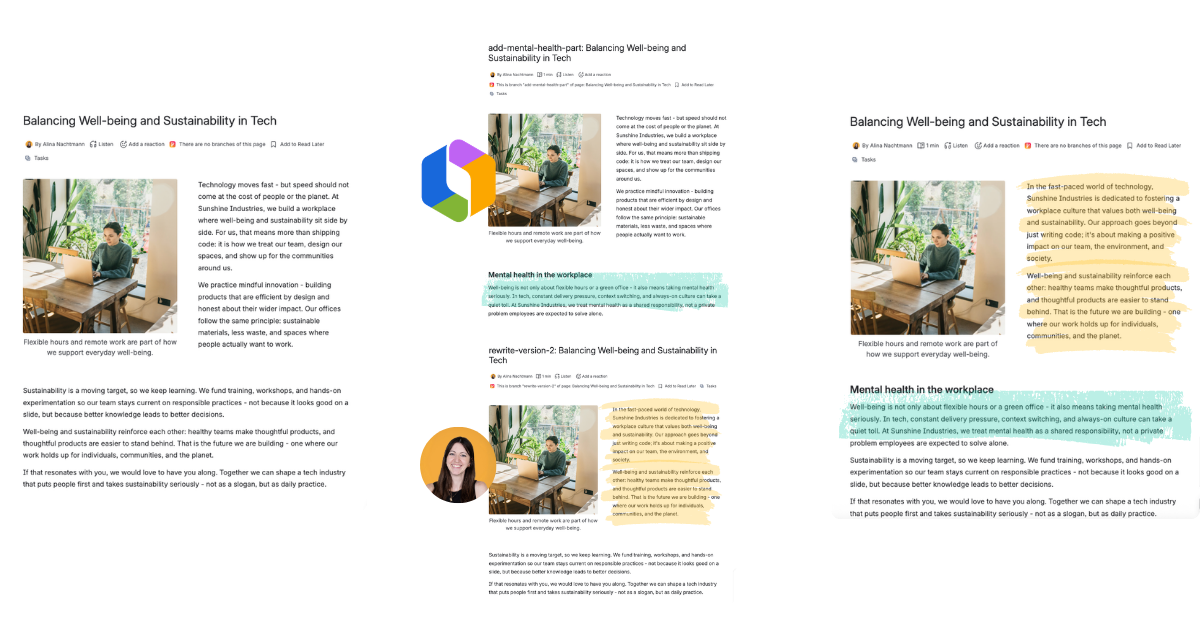
Page Branching brings a Git-style workflow to Confluence: branch, edit, review in a diff, and merge when you are ready.
Rovo and team members editing Page Branching branches in parallel

Governed AI editing for Confluence

Many teams want AI to speed up writing — but few trust agents with direct access to live documentation. With Page Branching, Rovo and other AI tools draft on an isolated branch, not your published page. You review every suggestion in the visual diff, and nothing goes live until a human merges.

Draft with Rovo

Let Atlassian Rovo and other agents generate or revise content on a branch. Your live page stays published while AI works in the background.

Review in the diff

See exactly what AI added, changed, or removed — additions, removals, and complex content included — before a single word reaches readers.

You control the merge

AI does the drafting. Your team keeps control. Approve and publish only when the branch is ready — one click to merge.

Built with Forge

Atlassian Silver Marketplace Partner Badge

Built with Forge

Page Branching runs on Atlassian's Forge platform. Your page content never leaves your Confluence instance.
FAQ

Frequently asked questions

What problem does Page Branching solve?

It lets teams draft Confluence page updates on an isolated copy while the live page stays unchanged. You review changes in a visual diff and merge only when ready.

How is Page Branching different from Confluence page history?

Confluence page history saves snapshots after each publish — you can view or restore past versions, but only one version is live at a time and collaborative drafting happens on the live page. Page Branching creates a separate branch page where you edit in isolation. Multiple people can work on different branches in parallel, review all changes in a visual diff before merging, and keep the live page unchanged until you explicitly publish.

How is a branch different from editing a page normally?

A branch is an independent copy of the page. Readers still see the original until you merge. That means no half-finished drafts going live and no accidental overwrites.

Can multiple people work on the same page?

Yes. Each person can work on their own branch of the same page. If the live page changed in the meantime, Page Branching surfaces merge conflicts clearly.

Does Page Branching work with attachments?

Yes. New, updated, and deleted attachments are handled when you merge a branch back into the original page.

Is Page Branching available on Confluence Cloud?

Yes. Page Branching for Confluence Cloud is available on the Atlassian Marketplace and built on Atlassian Forge.

Can I use Page Branching with AI writing tools?

Yes. Agents like Rovo can draft on a branch instead of the live page. You review every change in the diff and nothing publishes until a human merges.

Who typically uses Page Branching?

Documentation teams, compliance and legal, product and engineering, knowledge managers, and any team that needs a governed draft-and-publish workflow in Confluence.

What happens when I merge a branch?

Approved changes from your branch are applied to the live page. You can review the full diff first and resolve any conflicts if the original changed while you were editing.
Try Page Branching now

Ready to branch, review, and merge in Confluence?

Install Page Branching, create your first branch, and start drafting in minutes.