Task Reminder Logo
Task Reminder
4.1/5
Confluence tasks pile up. Deadlines slip. Task Reminder keeps everyone on track.
Send scheduled email or Slack reminders for overdue, upcoming, and open Confluence tasks — so assignees act on time without you chasing them across pages.
We empower 3.3+ million users worldwide
Features

What Task Reminder does

Scheduled reminders

Run email or Slack digests on a schedule admins control — daily, weekly, or whatever fits your team's rhythm.

Works with existing tasks

Works with inline tasks and task reports already on your pages. No duplicate tool, no extra data entry.

Custom email templates

Tailor subject lines, body text, and dynamic placeholders to match your team's tone — then preview before sending.

Targeted notifications

Choose user groups, channels, and which task lists each reminder includes — overdue, due soon, with due date, or open.

Space & dashboard views

Give teams a space-level task overview and a dashboard panel with their most urgent work at a glance.

Forge-native & secure

Built on Atlassian Forge. Task data stays in your Confluence instance — reminders go only to the channels you configure.
Who it's for

Built for these teams

Project Managers
Surface overdue action items from meeting notes and project pages so nothing falls through the cracks between standups.
HR & Operations
Remind owners about onboarding checklists, policy reviews, and recurring operational tasks without manual follow-up emails.
Knowledge managers
Drive content refresh cycles and documentation upkeep with scheduled reminders tied to Confluence task assignments.
Event planners
Run lightweight to-do lists on Confluence pages and let Task Reminder keep every deadline visible as the event approaches.
Distributed teams
Reach people where they work — email digests for some, Slack pings for others — with separate schedules per channel.
Content & Marketing
Keep blog posts, social campaigns, and approvals moving with timely nudges when drafts, reviews, or publish dates are due.
Task Reminder by Lively Apps turns Confluence tasks into a reliable accountability loop — configure once, remind automatically, and keep work visible without adding another tool to the stack.
How it works

The gap between creating tasks and completing them

Teams track work in Confluence — meeting notes, project pages, checklists — but tasks get buried as pages multiply. People assume someone else will follow up, or they simply forget what is due.

Task Reminder closes that loop. Admins configure schedules and channels once; assignees receive clear digests of what needs attention — in email, Slack, or both.
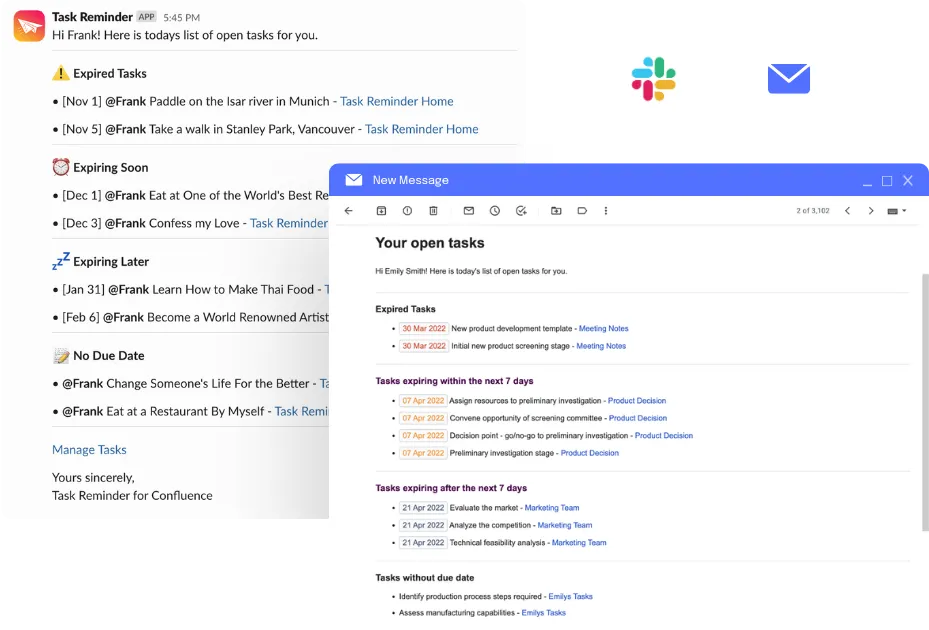
Task Reminder email and Slack notification examples

Configure once, then it runs

Set schedules & channels

Admins choose when and where reminders go — email, Slack, or both — and which task lists each digest includes.

Digests go out automatically

On schedule, Task Reminder gathers each assignee's overdue, upcoming, and open tasks and sends them — no one has to chase updates manually.

Assignees complete in Confluence

Recipients see what is due, click through to the page, and check tasks off — without a second tool or duplicate tracking.

Built with Forge

Atlassian Silver Marketplace Partner Badge

Built with Forge

Task Reminder runs on Atlassian's Forge platform. Your task data never leaves your Confluence instance.
FAQ

Frequently asked questions

What problem does Task Reminder solve?

Confluence tasks are easy to create but easy to forget. Task Reminder sends scheduled email or Slack reminders so assignees see overdue, upcoming, and open tasks without checking every page manually.

How is Task Reminder different from Confluence notifications?

Confluence sends event-based notifications when someone assigns or mentions you. Task Reminder adds scheduled digests that summarize your task lists — overdue, due soon, and open — on a cadence your admin configures.

Can I send reminders via Slack?

Yes. Connect your Slack workspace in a few clicks and run email and Slack reminders on separate schedules, for different user groups, or use just one channel.

Can I customize reminder emails?

Yes. Admins can customize subject lines, body text, and dynamic placeholders, then preview a test email before reminders go out to the team.

What tasks are included in reminders?

Reminders can include overdue tasks, tasks due within a configurable window, tasks with a due date, and open tasks without a due date. Admins choose which lists appear in each schedule.

Does Task Reminder require a separate task tool?

No. Task Reminder works with native Confluence inline tasks and task reports — no duplicate data, no new tool for your team to learn.

Is Task Reminder available on Confluence Cloud?

Yes. Task Reminder for Confluence Cloud is available on the Atlassian Marketplace and is fully built on Atlassian Forge.

Who typically uses Task Reminder?

Content and marketing teams, project managers, HR and operations, knowledge managers, and any team that tracks work with Confluence tasks and needs reliable follow-up.

Can admins control who receives reminders?

Yes. Admins configure user groups, schedules, channels, and which task categories each reminder includes — so the right people get the right nudge at the right time.
Try Task Reminder now

Ready to stop missing Confluence deadlines?

Install Task Reminder, configure your first schedule, and start sending reminders in minutes.