Diary Logo
Diary
5/5
Long pages need constant updates. Diary makes adding them effortless.
Add timestamped entries to any Confluence page right in view mode — for decision logs, changelogs, and project journals, with no editor and no republishing.
We empower 3.3+ million users worldwide
Features

What Diary does

Edit in view mode

Write, edit, and delete timestamped entries directly on the page. An update takes seconds — no editor, no republishing.

Entry templates

Give entries a standard structure so journals stay consistent, no matter how many people contribute.

Simple or Bubble style

Choose rule-separated entries or author-attributed bubbles, and paginate long journals to keep them easy to navigate.

PDF & Word export

Export your journal to PDF or Word straight from the page. The export contains the full entries table — dates, times, authors, and content — exactly as readers see it.

Searchable & permission-aware

Entries stay searchable and versioned, and they follow the permissions of the page they live on.

Forge-native & secure

Built on Atlassian Forge. Your journal data stays in your Confluence instance.
Who it's for

Built for these teams

Project Managers
Keep a running project journal — milestones, blockers, and status notes — that the whole team can add to in seconds.
Product & Engineering
Maintain changelogs and decision logs on the page, with every entry timestamped and attributed.
Knowledge managers
Turn living documents into chronological records without forcing contributors into the editor.
Customer Success
Log customer calls and account updates in one place so everyone sees the latest context.
Distributed teams
Share asynchronous updates across time zones in a single, timestamped stream.
Leadership & Compliance
Record decisions with a clear audit trail — searchable, versioned, and covered by page permissions.
Diary by Lively Apps turns any Confluence page into a living team journal — quick to write, easy to read, and always in one place.
How it works

The gap between knowing an update and writing it down

Decisions, changes, and project updates belong on a shared page — but opening the editor, finding the right spot, and republishing is enough friction that updates get skipped.

Diary removes that friction. Add an entry in view mode, and it is timestamped, attributed, and visible to the whole team right away.
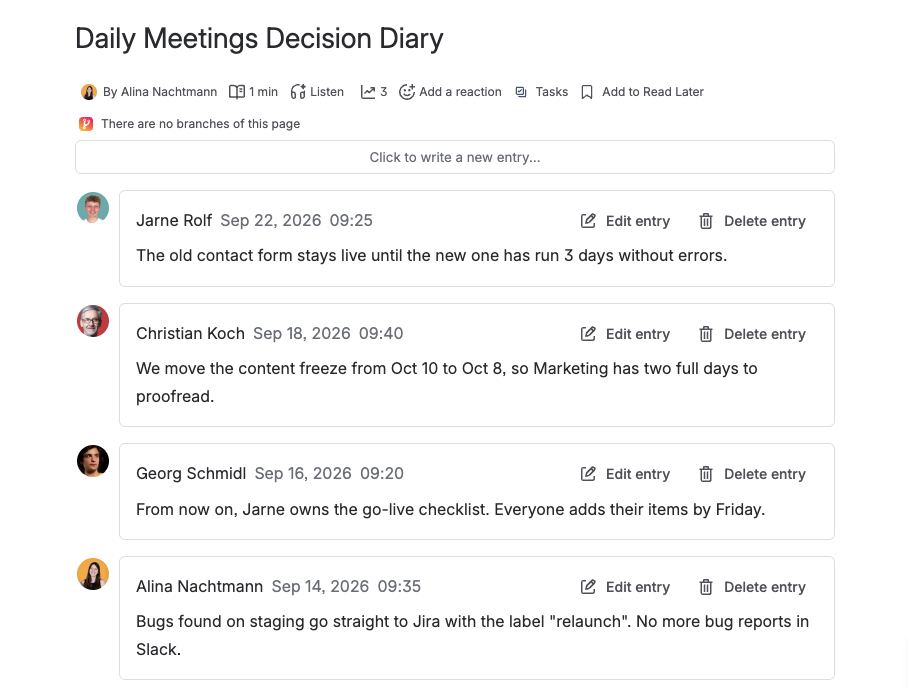
Diary decision log on a Confluence page

Add an entry in three steps

Add Diary to a page

Insert the Diary macro on any Confluence page and pick a template and display style.

Write entries in view mode

Team members add timestamped entries directly on the published page — no editor needed.

Read, search, and export

Entries stay searchable and versioned. Paginate long journals or export to PDF and Word.

Built with Forge

Atlassian Silver Marketplace Partner Badge

Built with Forge

Diary runs on Atlassian's Forge platform. Your journal data never leaves your Confluence instance.
FAQ

Frequently asked questions

What problem does Diary solve?

Some Confluence pages keep growing — decision logs, changelogs, project journals — but updating them means opening the editor and republishing. Diary lets you add timestamped entries directly in view mode, so an update takes seconds.

Do I need to open the Confluence editor to add an entry?

No. You write, edit, and delete entries directly on the published page in view mode. The page does not need to be republished.

Can I use templates for entries?

Yes. Templates give entries a standard structure, so journals stay consistent even when many people contribute.

What display styles are available?

Diary offers a Simple style with rules between entries and a Bubble style that attributes each entry to its author. Long journals can be paginated.

Can I export a Diary to PDF or Word?

Yes. Diary entries are part of the page, so you can export them to PDF or Word directly from the page. The export includes the entries table — dates, times, authors, and content — matching what readers see on the page, so nothing is lost. The same rendering is used when you compare page versions in the revision history.

Are Diary entries searchable and covered by page permissions?

Yes. Entries stay searchable and versioned, and they follow the permissions of the page they live on.

Where is my data stored?

Diary is built on Atlassian Forge. Your data remains within your Confluence instance.
Try Diary now

Ready to keep your team's journal on the page?

Install Diary, add it to a page, and write your first entry in minutes.