Lively Blogs Logo
Lively Blogs
4.8/5
Company news gets lost in plain blog lists. Lively Blogs makes updates impossible to miss.
Turn Confluence into a premium news platform with rich feeds, image and video teasers, and pinned posts — so leadership updates and team news stay visible.
We empower 3.3+ million users worldwide
Features

What Lively Blogs does

Blog feeds on any page

Embed visually rich blog streams on Confluence pages, space homepages, or company dashboards — list or grid view, filtered by space, label, or author.

Layouts & customizable elements

Pick list or grid layouts and toggle what each feed entry shows — author, date, labels, likes, comments, and more — so every stream matches your brand and what readers need.

Pin important updates

Mark posts as important and keep leadership messages, HR announcements, and release notes pinned at the top — where everyone sees them first.

Personal feeds & bookmarks

Let users follow the spaces, labels, and authors they care about in a personal My Feed — and save posts to Read Later when something looks interesting but it is not the right moment.

Homepage & dashboard feeds

Add a company-wide news stream to the Confluence homepage or dashboard panel — one place where employees check what is new.

Image & video teasers

Add teaser images or videos to every post so feeds look polished and scannable. Get reminders when a post is missing a teaser before it goes live.
Who it's for

Built for these teams

Internal communications
Centralize company news in one customized feed instead of scattering updates across spaces that nobody checks.
HR & People teams
Share policy updates, onboarding news, and culture stories with pinned posts that reach distributed teams reliably.
Marketing & leadership
Publish campaign launches, strategic updates, and release notes with teasers that drive attention — not scroll-past fatigue.
Department publishers
Let engineering, sales, and operations teams contribute to a shared news channel without giving up their own space identity.
Culture teams
Celebrate wins, spotlight teams, and build community with blog posts that look as good as they read.
Readers at scale
Lots of teams and spaces? My Feed lets each user subscribe to the authors, labels, and spaces they actually need.
Lively Blogs by Lively Apps turns Confluence into the place teams actually read — embed feeds where people work, pin what matters, and make internal news feel alive.
How it works

The gap between posting updates and getting them read

Teams publish in Confluence blogs, but plain lists hide important news. Updates blend together, teaser images get skipped, and employees stop checking — especially across time zones.

Lively Blogs closes that gap. Configure a feed once, pin what matters, and give every post the visual polish it needs to earn attention.
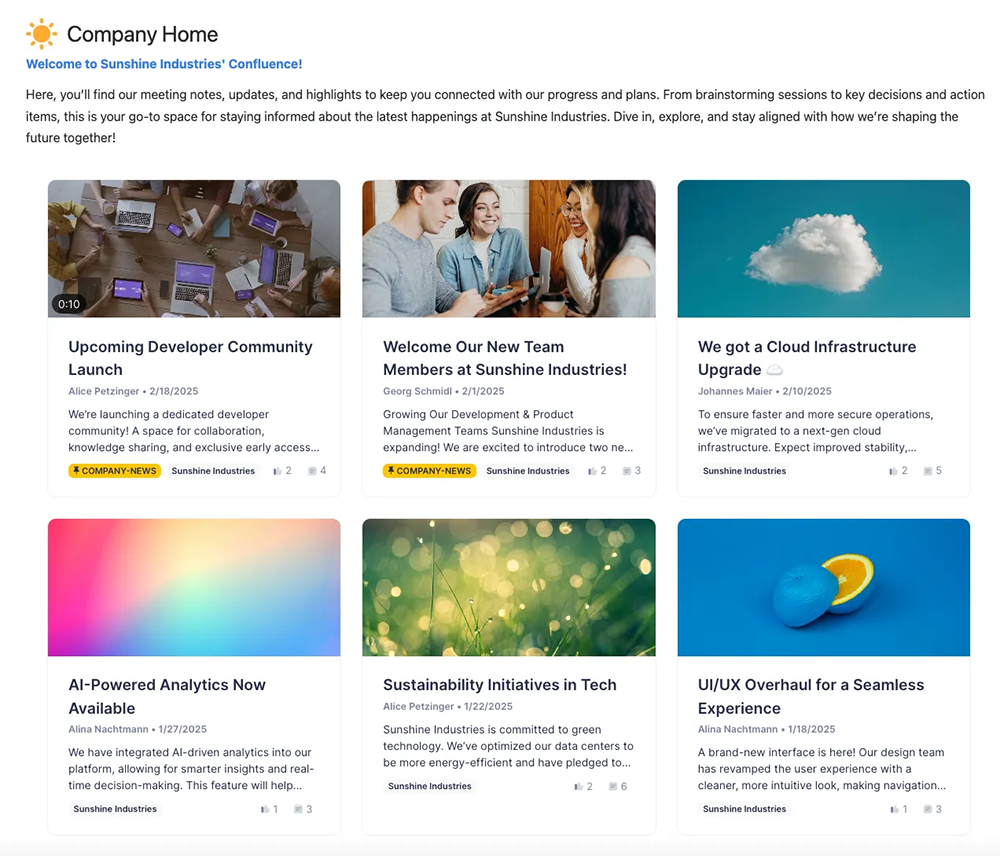
Lively Blogs content feed in Confluence showing blog posts with teaser images

From scattered posts to a news hub

Configure your feed

Add the Lively Blogs macro or homepage feed, choose layout and filters, and decide which spaces or labels contribute to the stream.

Publish with teasers

Teams write Confluence blog posts as usual — with image or video teasers, custom layouts, and an important label when updates cannot wait.

Employees stay in the loop

Readers browse a customized feed on the homepage, dashboard, or any embedded page — and engage with likes and comments without leaving Confluence.

Built with Forge

Atlassian Silver Marketplace Partner Badge

Built with Forge

Lively Blogs runs on Atlassian's Forge platform. Your content stays in your Confluence instance.
FAQ

Frequently asked questions

What problem does Lively Blogs solve?

Important company news gets buried in plain Confluence blog lists. Lively Blogs turns updates into visually engaging feeds with teasers, pinned posts, and layouts that make internal communication impossible to miss.

Can I embed blog feeds on Confluence pages?

Yes. Use the Lively Blogs macro to show blog streams on any page — project hubs, department spaces, or a company news dashboard — with list or grid layouts.

Can I pin important posts to the top?

Yes. Mark posts as important and they stay pinned at the top of feeds and homepage views — ideal for leadership updates, HR announcements, and time-sensitive news.

Does Lively Blogs support images and video teasers?

Yes. Add teaser images or videos to blog posts so feeds look polished and scannable. Admins can even get reminders when a post is missing a teaser image.

Can I customize how blog posts look?

Yes. Choose layouts, control which elements appear, match your brand colors, and configure feeds per space — so internal news feels like your company, not generic Confluence.

Who typically uses Lively Blogs?

Internal communications teams, HR, marketing, leadership offices, and any team that publishes company news, release notes, or culture updates in Confluence.

Is Lively Blogs available on Confluence Cloud and Data Center?

Yes. Lively Blogs is available on Confluence Cloud and Data Center via the Atlassian Marketplace, with a migration path from Data Center to Cloud.

Is Lively Blogs a trusted Atlassian Cloud app?

Yes. Lively Blogs for Confluence Cloud carries Atlassian trust badges including Cloud Fortified and Runs on Atlassian — meeting Atlassian standards for security, reliability, and support.
Try Lively Blogs now

Ready to turn Confluence into your news hub?

Install Lively Blogs, embed your first feed, and start sharing updates that get read.