Your team built a reporting page in Confluence. PocketQuery pulls the data, the table renders, and everyone has access. But the table has 300 rows - and until now, readers had no way to filter or sort it. Some teams worked around this by stacking multiple macros, which led to maintenance headaches and unexpected rendering issues. With PocketQuery 13.21.0 we introduced table filters and column sorting to solve this. Authors enable them once in the PocketQuery macro settings - readers filter the data themselves, right on the page.
Explore data where it lives
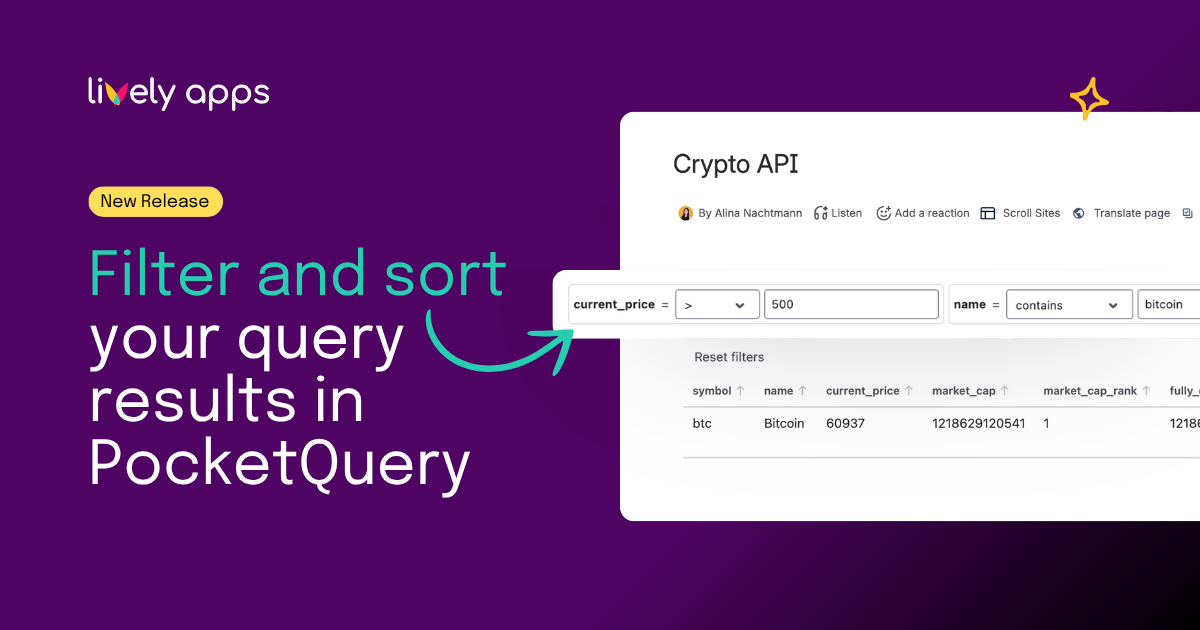
Authors enable Table Filters in the PocketQuery macro settings and define which filter controls appear. Readers then get dropdowns, free-text, number and date filters, whole-table search, empty/not-empty rules, hidden columns, and Top N limits - right inside the macro output.
.png)
That is especially helpful on dashboards and reporting pages where the same query returns dozens or hundreds of rows, but readers only need a focused slice.
Sort columns without losing your place
Clicking a column header sorts the table. Sorting works alongside active filters, so readers can narrow to the relevant rows and then rank them. A reset button restores the configured default state at any time.
Author control, familiar reader experience
Authors choose which filters appear per macro, so the same query can be presented differently on different pages. Readers get a standard table experience inside Confluence instead of bouncing between exports and spreadsheets.
Everything works within the PocketQuery macro. No stacked macros, no workarounds.
Learn more
- Product help: Filters in PocketQuery
- Release notes: PocketQuery 13.21.0
Try it
Available in PocketQuery for Confluence Cloud. Open a page with a PocketQuery macro, enable Table Filters in the macro settings, and publish - your readers can start filtering right away.
Questions? Reach us via Lively Apps Support.